

Online Seat Reservation
All library reading seats are managed through a seat reservation system. Readers can select a seat by swiping their card, using facial recognition, or scanning a QR code. The specific rules and methods are as follows:
1. Seat Selection Requirement:
Readers who need to use a reading seat must select a seat using the reservation system. Those who do not select a seat or whose selected seat is invalid must vacate the seat for readers who have a valid seat reservation.
2. Seat Reservation Machines:
-
- Main Campus: There are 4 seat reservation machines on each floor (1st to 4th floors), located near the northeast corner elevator entrance.
- Shunde Campus: Seat reservation machines are located in the lobby and at the entrance of the reading areas on the 2nd to 4th floors.
Readers can operate any machine to select a reading seat on any floor.
3. Seat Area Classification:
The reading areas are divided into several sections based on their location, marked with letters A, B, C, D, such as “Second Floor South (A Zone)” and “Second Floor West (B Zone)”. Seat numbers are in the format of A001, B056, etc. Seat labels are attached to the bottom left or bottom right corner of the reading desks.
4. Seat Selection Process:
Readers must first choose the floor and area, then select a seat marked in green. After confirming by swiping their campus card, the reader can take the assigned seat. If a reader finds that their selected seat is occupied by someone else, they have the right to ask the other person to vacate the seat. If the situation cannot be resolved through negotiation, the reader can seek assistance from library staff.
5. Leaving the Library with a Reserved Seat:
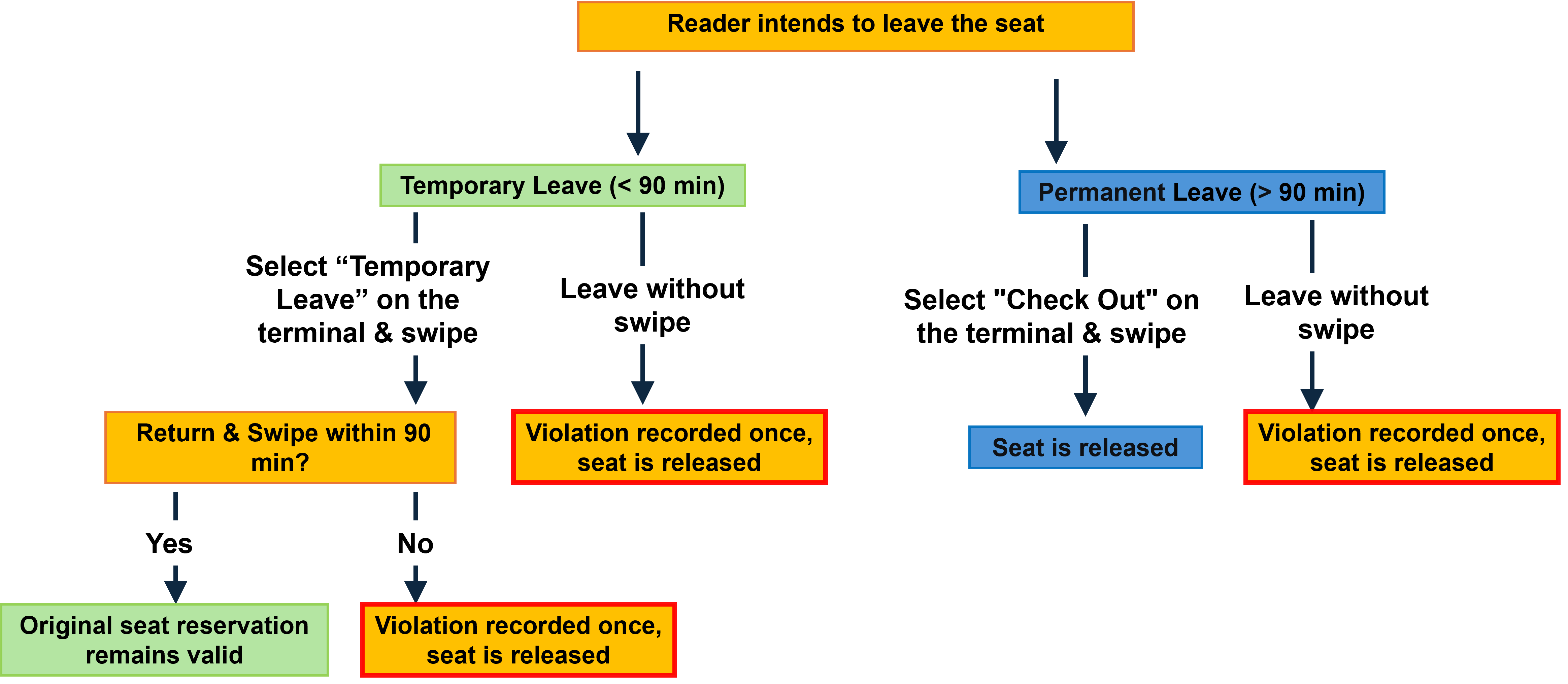
Readers who have selected a seat must swipe their card at the reservation machine to log their departure, regardless of how they leave the library. Failure to do so will result in a “violation” being recorded against the reader.
If a reader temporarily leaves the library, they should select “Temporarily Leave” on the reservation machine and swipe their card. The seat will be reserved for 60 minutes. Upon return, the reader only needs to swipe their card to re-enter the library and resume using the same seat. If the reader does not return and swipe their card within 60 minutes, the system will automatically release the seat for others, and the reader will receive a "violation" record.
If a reader wishes to leave the seat but stay in the library, they do not need to swipe their card.
Visual Instructions:
6. Seat Reservation System Shutdown:
The seat reservation system will stop accepting reservations 1 hour before the library closes each night. During this period, readers can exit their seats in advance to avoid the peak time for leaving the library at closing. By selecting "Sign Out" and swiping their card, they can continue using their reserved seat until the library closes.
7. Real-Time Seat Availability Check:
Readers can use a computer or smartphone to check the real-time seat availability in the library (accessible within the campus network).
Seat Reservation
Readers can log in to the library's seat reservation system (accessible within the campus network) to reserve a seat for the morning opening each day. The login username for the reservation system is the campus network main account and password.
Specific instructions for seat reservation are as follows:
1. The reservation system is open daily from 7:00 AM to 11:59 PM. Readers can reserve seats for the morning opening at 8:00 AM on the following day.
2. Reserved seats for the next day at 8:00 AM will be held until 8:30 AM. Readers who successfully reserve a seat must swipe their card at the gate before 8:30 AM to enter the library and can directly go to their reserved seat without further actions at the seat selection machine. The system will automatically update the seat status from "Reserved" to "In Use." If the reader does not swipe their card at the gate before 8:30 AM, the reservation will be considered a "Reservation Violation," and the seat will be released for others to use. Readers who cannot attend the reservation on time can cancel their reservation before the system closes.
3. Same-day reservations cannot be canceled, only next-day reservations can be canceled. Please plan your time accordingly.
Violation Penalties
1. If a reader accumulates 3 "Usage Violations" or "Reservation Violations," they will be suspended from using the seat system for 7 days, and the violation count will be reset to zero. The violation count is based on a monthly cycle, and the system will automatically reset the count on the 1st of each month at midnight.
2. Readers must maintain order in the reading areas and are prohibited from using personal items to occupy reading seats, lounge chairs, or other public facilities such as free bookshelves. Those who occupy seats improperly will receive an "Occupation Violation." If the reader accumulates 3 "Occupation Violations," they will be suspended from using the seat system for 7 days. The library is not responsible for personal items left unattended in reserved seats, and any loss is the responsibility of the owner.
3. Readers who violate the rules, cause disputes, or damage others' interests will be given a warning and education by the library. In severe cases, the library will report the matter to the relevant department of the reader's school or department for further action.
If you have any suggestions or feedback regarding the seat reservation rules and system, please contact the Learning Support Department at (61648054, dianziziyuan@163.com; 62789013, journal@smu.edu.cn).